AI audio & video transcription that fits your workflow
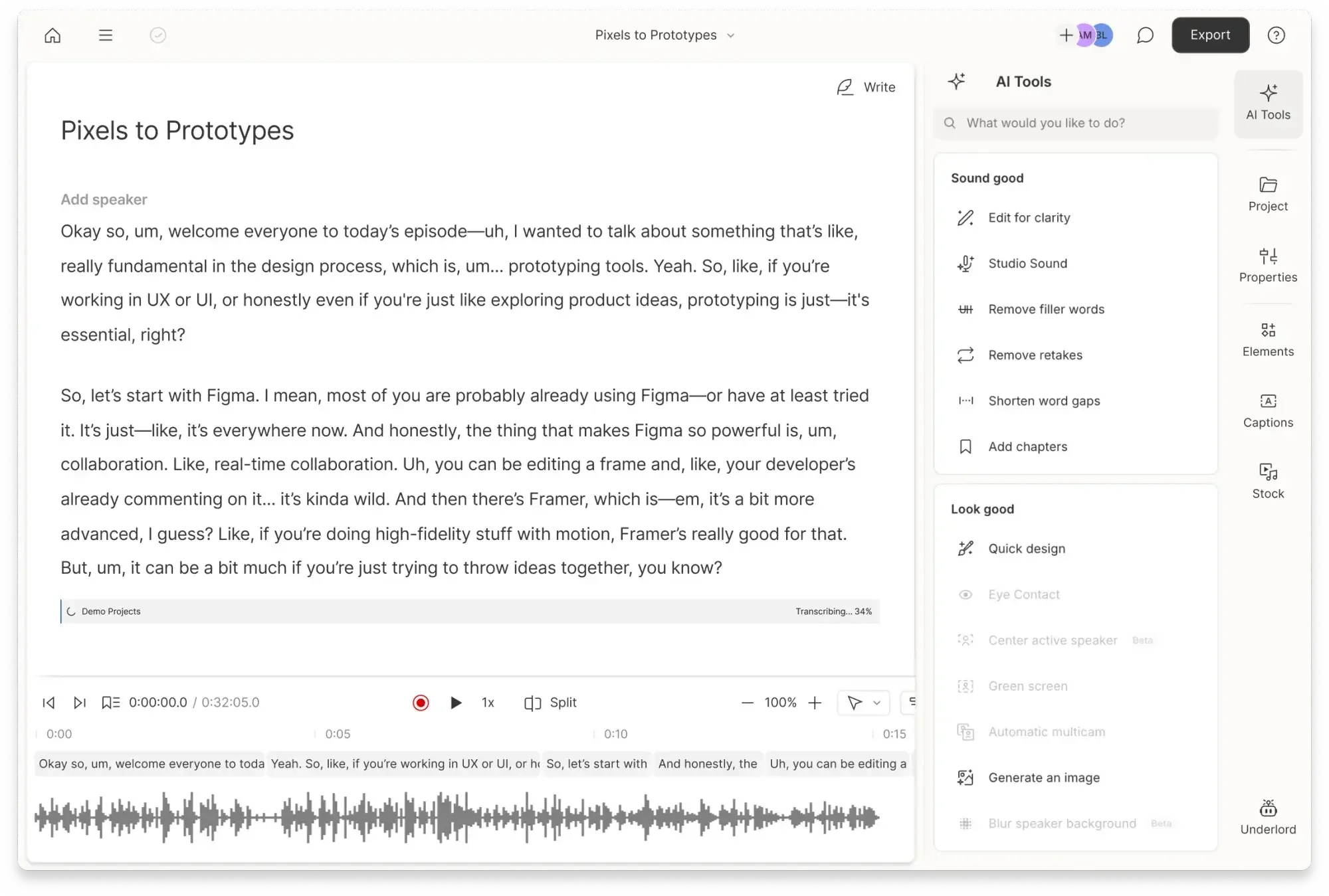
Get fast, accurate audio-to-text and video transcription in Descript. Then edit your video or podcast like a doc and add captions in seconds.

These companies use Descript. Not bad!















Accurate transcription—fast
Descript’s AI transcription captures your words and gets them right. With industry-leading precision across 25 languages, your transcripts are ready to edit, translate, or share.

Edit, translate, add captions
With Descript’s text-based editing, delete, copy, and paste in the transcript to edit your audio and video.
Remove filler words

Add captions with a click

Fix dialogue with AI, not re-recording

Translate transcripts and captions, instantly

PRICING
Surely there’s one for you
Free
$0
$0
per person / month
Start your journey with text-based editing


1 media hour / month

100 AI credits / month

Export 720p, watermark-free

Limited use of Underlord, our agentic video co-editor and AI tools

Limited trial of AI Speech
Hobbyist
$24
$16
per person / month
1 person included
Elevate your projects, watermark-free
10 media hours / month
400 AI credits / month
Export 1080p, watermark-free
Access to Underlord, our AI video co-editor

AI tools including Studio Sound, Remove Filler Words, Create Clips, and more
AI Speech with custom voice clones and video regenerate
Most Popular
Creator
$35
$24
per person / month
Scale to a team of 3 (billed separately)
Unlock advanced AI-powered creativity
30 media hours / month
+5 bonus hours
800 AI credits / month
+500 bonus credits
Export 4k, watermark-free
Full access to Underlord, our AI video co-editor and 20+ more AI tools

Generate video with the latest AI models

Unlimited access to royalty-free stock media library

Access to top ups for more media hours and AI credits
Don’t just take our word for it
With a 4.6-out-of-5-star rating and a bunch of distinctions on G2, Descript’s users have declared it an industry standard in the video & podcasting world.
2025
Best Software
Frequently asked questions
What is Descript’s AI transcription?
Descript’s AI transcription automatically converts audio or video into editable text in seconds, combining industry-leading accuracy with instant editing tools.
How accurate is Descript’s transcription?
Descript’s AI transcription delivers up to 95% accuracy, producing clean, ready-to-edit transcripts with minimal manual fixes required.
Can I edit my video or podcast by editing text?
Yes. Descript lets you edit video, audio, or podcasts by editing text, just like a doc—delete words or move sentences and your media updates instantly.
Does Descript support multiple languages and translation?
Yes. Descript supports 30+ languages for transcription and lets you translate transcripts, captions, or audio instantly—helping creators reach global audiences with multilingual content.
How do I add captions to my videos?
Descript automatically generates time-synced captions from your transcript. You can edit the text to adjust timing, and captions update to stay aligned with your media.
Can Descript remove filler words like “um” and “uh”?
Yes. Descript’s AI automatically detects and removes filler words to make your recordings sound clean, polished, and professional.
Can I update or fix dialogue without re-recording?
Yes. With Descript’s AI voice tools, you can change your script and regenerate the spoken audio — using your own trained voice or a stock voice — no re-recording required.
Is there a free plan for Descript’s transcription tools?
Yes. Descript offers a free plan so you can try AI transcription, captions, and text-based editing before upgrading for longer files and premium features. Free users get 1 hour of media minutes each month to explore Descript’s AI-powered tools.
How is Descript different from other transcription software?
Unlike basic transcription tools, Descript combines AI transcription, video editing, captions, translation, and AI voice synthesis—all in one intuitive workspace.


© Descript 2026